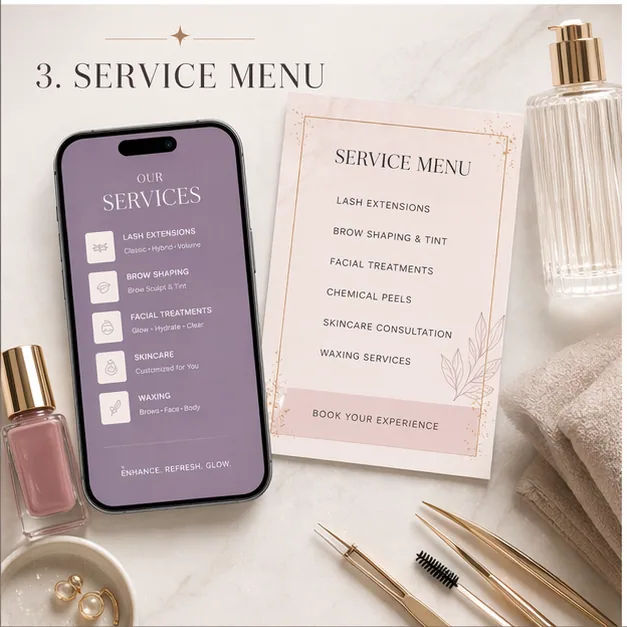
How do you group services by client need?
Instead of listing every service at once, group services by what the client wants: maintenance, first appointment, special event, refresh, repair, or premium result.
This makes the menu feel easier to scan and helps clients avoid choosing the wrong service.
How do you explain who each service fits?
Add simple context around who should book each option, how long it takes, what result to expect, and when to rebook.
Clients often hesitate because they are not sure which service matches their goal.
How do you turn the menu into multiple posts?
One service menu can become a full content series: full menu, featured service, FAQ story, booking reminder, and rebooking prompt.
This keeps the same service information visible without repeating the exact same graphic.
How do you keep prices and policies current?
If pricing, deposits, cancellation rules, or appointment length changes often, update the asset before reposting.
Outdated service content creates avoidable booking friction.
How do you turn the menu into a decision tool?
Salon service menu content should help clients choose, not just list everything available. Group services by goal, maintenance stage, first visit, special occasion, or refresh need.
When the menu is organized around the client decision, booking feels simpler.
How do you give each service enough context to book?
A service name alone is often not enough. Add who it fits, appointment length, maintenance timing, starting price when useful, and what to select in the booking system.
That context reduces back-and-forth messages and wrong-service bookings.
How do you create posts from the menu instead of reposting the menu?
One menu can become a featured service post, add-on explainer, FAQ story, rebooking reminder, and seasonal service recommendation.
This gives the business more booking content while keeping the information consistent.
How do you make the menu easy to act on today?
A service menu converts when the client can choose without feeling unsure. Use plain service names, clear categories, booking-system language, and a direct CTA that matches how appointments are actually scheduled.
If the client still has to DM basic questions about timing, fit, or price, the menu has not done enough work. Add the missing decision detail before reposting it.
How do you reduce wrong bookings with plain-language service fit?
Wrong-service bookings waste time and create avoidable client frustration. Add short fit notes beside the menu item so new clients can tell whether they need a full set, fill, correction, refresh, consultation, or maintenance appointment.
When the menu teaches the choice, clients book with more confidence and the provider spends less time sorting details in DMs.
The finished asset should feel like a shortcut to the right appointment, not a decorative price list. That is what makes service menu content convert.
What does current guidance change about this plan?
We reviewed FDA cosmetic-claim guidance, FTC health and endorsement material, and Google post documentation. The resulting framework turns the service menu into accurate decision support instead of a list of unsupported outcomes.
Menu language should distinguish appearance from treatment
FDA explains that intended use and claims can affect whether a product is treated as a cosmetic or a drug. Service-menu content should avoid casually adopting medical claims from trends or supplier marketing.
How to apply itSource descriptions from the approved menu, product labeling, and qualified professional review. Describe process, appearance, maintenance, and fit without promising treatment of a condition.
Review FDA: Cosmetics labeling claimsVisual results communicate claims even without explicit words
FTC health guidance evaluates the overall impression of advertising. Cropping, lighting, retouching, selection, and captions can collectively imply a level or typicality of result.
How to apply itMaintain consent and context for every result image, disclose relevant limitations, and do not materially alter the outcome. Use consultation language when results depend on individual factors.
Review FTC: Health Products Compliance GuidanceService choice should lead to a specific booking action
Google posts can combine media, details, and an action button. A useful menu campaign should help a customer distinguish services before sending them to the appropriate booking or consultation path.
How to apply itGive each featured service its duration, starting price or quote basis, maintenance expectation, provider requirement, contraindication handoff, and exact booking category.
Review Google Business Profile: Create and manage postsWhich useful examples can you adapt?
These are not fake captions to copy word for word. Use them as structure, then replace the proof, timing, and CTA with real business details.
For a cancellation opening, show the real time, eligible service, approved result photo, booking method, and what happens if the slot is claimed.
Replace every detail with the current business facts, then keep only the evidence needed to choose the service and book the correct appointment.
Can a new client tell whether this service fits their goal?
Answer with one approved input from real portfolio photos, accurate service names, booking-system details, policy notes, and client-approved context. Do not add a claim that the source material cannot support.
Are timing, maintenance, policy, and booking details accurate today?
Use the caption to remove that friction, then tell the reader how to choose the service and book the correct appointment without introducing a second CTA.
Which authoritative sources should the practice review?
Use these sources as a starting point, then follow the laws, professional rules, and qualified advice that apply to the practice and its location.
- FDA: Cosmetics labeling claims FDA guidance on the line between cosmetic claims and claims that can cause a product to be regulated as a drug.
- FTC: Health Products Compliance Guidance FTC guidance on clear disclosures, competent and reliable scientific evidence, and truthful health-related advertising.
- FTC: Advertising FAQs for small business The FTC's plain-language guidance on truthful, non-deceptive advertising and the evidence expected behind objective claims.
- FTC: Endorsements, influencers, and reviews FTC guidance and resources for testimonials, endorsements, material connections, and consumer reviews.
- Google Business Profile: Create and manage posts Google's current documentation for updates, offers, events, media, buttons, and post archiving.