
Descript Review (2025): Best AI Video Editor for Creators and Teams?
What is Descript?
Descript helps creators and teams produce videos and podcasts by editing media as easily as editing text. It combines instant transcription, AI-assisted scripting and design, and time-saving tools like smart layouts, transitions, and audio cleanup.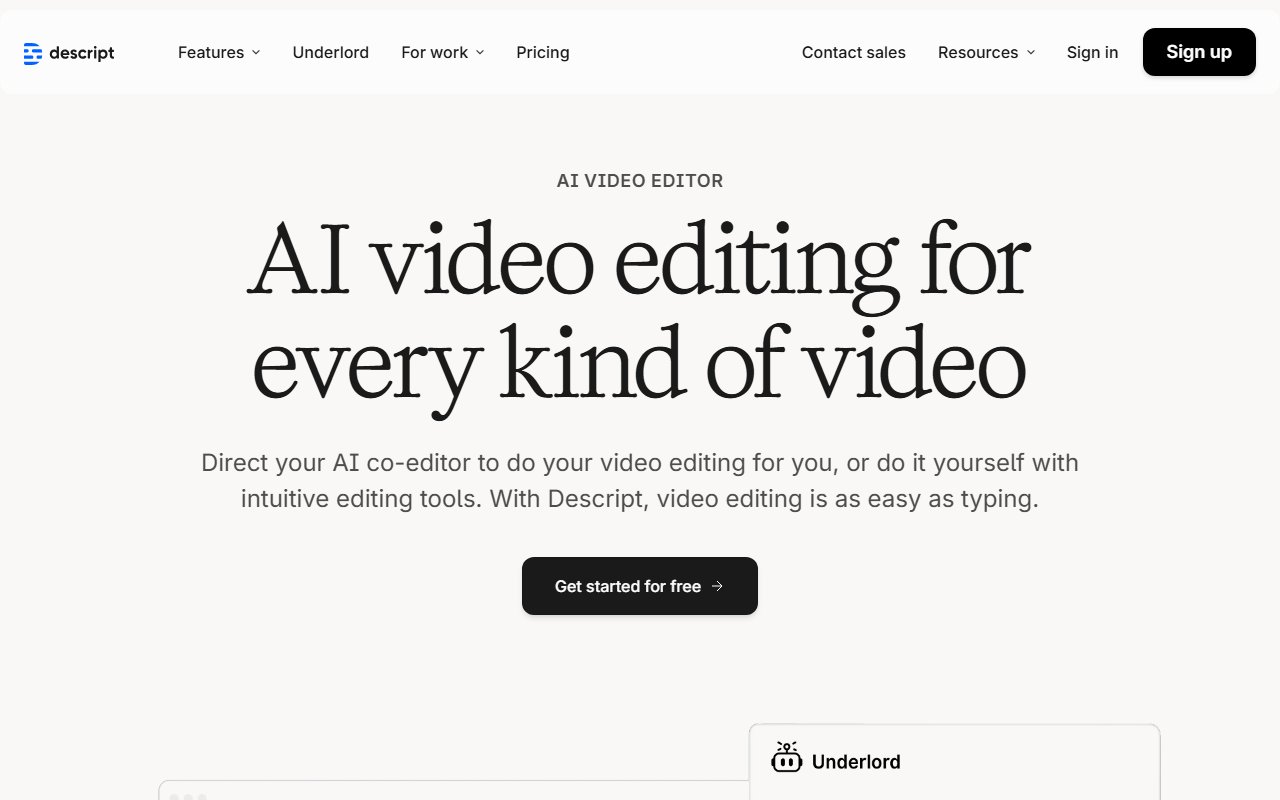
Overview
Key Features
Highlighted below are the standout features that make Descript unique:
Deep Analysis
A narrative analysis of strengths, trade-offs, and practical fit.
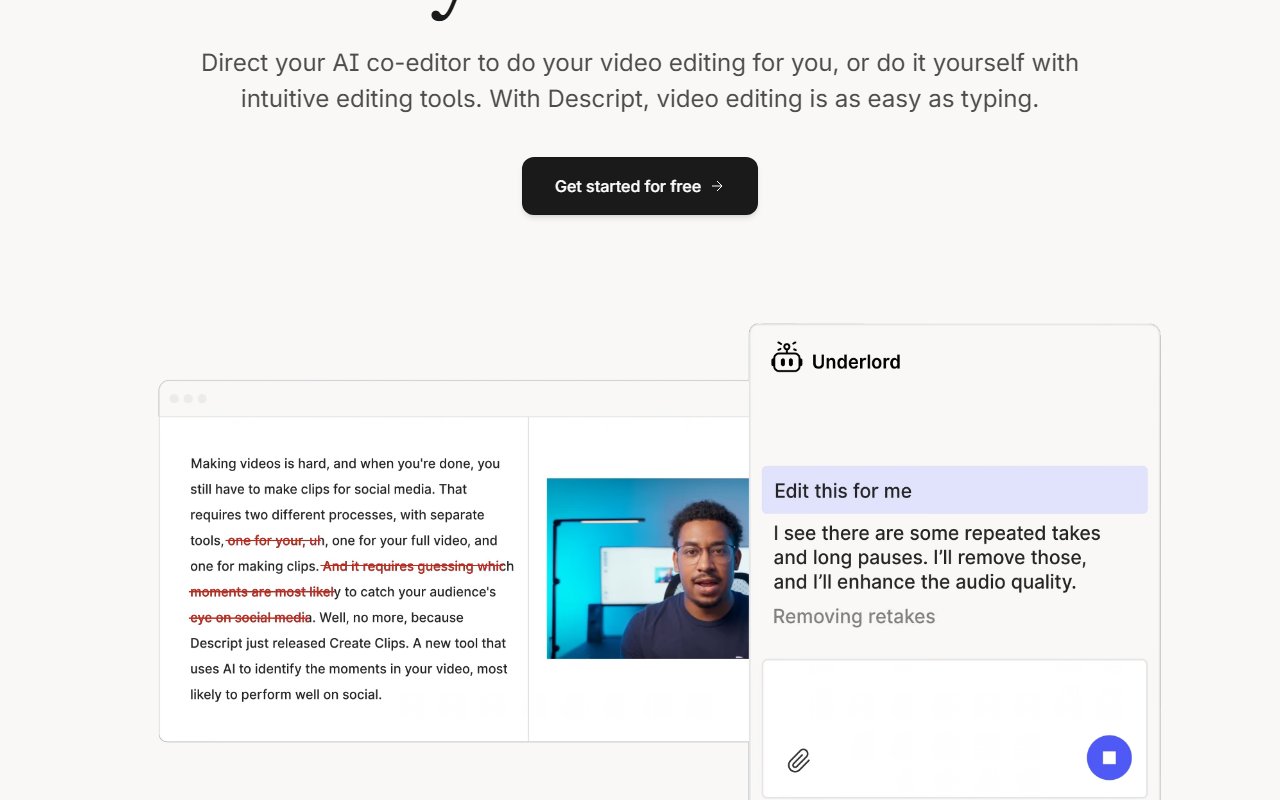
Descript is an AI video and podcast editor that makes editing feel like word processing. The hook is simple: record or import media, get an instant transcript, and edit the content by editing the text. Layer on Descript's AI Video Agent--Underlord--for scripting help, automated visual design, and quick refinements, and you can move from idea to finished video without wrestling a traditional timeline.
In practice, Descript speeds up the slowest parts of production. Start by writing your own script and ask Underlord for feedback or rewrites, then accept edits directly into your project. Prefer drafting from scratch? Describe what you want and let Underlord generate a script you can iterate on. When it's time to style the video, apply professionally designed layouts and smart transitions in a click. The smart transitions handle fades and scene changes automatically, so you spend less time keyframing and more time on substance. For visuals, Descript supplies a stock library of GIFs, B‑roll, music, and images, or you can prompt AI to generate custom images and tailored B‑roll. Want to avoid the camera entirely? Use an avatar, then tweak the look with quick design, colors, and fonts.
Audio polish is another differentiator. Studio Sound removes noise and enhances voices, so you can skip the pricey mics and treated rooms. If your delivery strays, Eye Contact makes it appear you were looking at the lens. Green Screen scrubs backgrounds so you can drop in a cleaner environment. The editor also attacks the classic time sucks: remove filler words--ums, uhs, likes--instantly across a project; correct a mispronounced word with Regenerate, which clones your voice and adjusts mouth movements to match; and add captions in a couple of clicks. Translation expands reach without leaving your chair, and transcription turns any audio or video into editable text in moments.
Descript isn't just for flagship videos. It's built for everyday content across the organization. Marketing can ship product demos, launches, and tutorials for websites and social channels. L&D teams can spin up internal training videos that people actually finish. Sales enablement can record and distribute training with consistent branding. Support teams can publish quick help videos that deflect tickets before customers get frustrated. Creators, meanwhile, get an all‑in‑one podcast editor--record, edit, publish, and cut promotional clips--and an AI tool that surfaces moments "most likely to go viral," then lets you refine them with text‑based edits. The result is a tool that helps teams communicate more, with higher production value, in less time.
There are trade‑offs. The breadth of features can feel overwhelming during the first projects; mastering scripting, design layouts, audio cleanup, avatars, and more takes a few sessions. Because it's an online editor, you won't have offline functionality. And while Underlord can draft scripts and design choices, AI output still benefits from human review to match brand nuance and pacing. Once you get past that learning curve, though, the workflow clicks: write, record, refine, and ship.
Descript suits marketers, trainers, sales and support teams, and independent creators who prioritize speed and polish over manual, timeline-first editing. If you want to reduce the drudgery--cleanup, formatting, clipping--while keeping creative control, the text‑based workflow and AI assists deliver real time savings. For teams without a dedicated video department, it turns "we should make a video" into something you can actually finish--and be proud to publish.
Ready to automate your workflows?
Experience AI-powered automation with Descript's intuitive chat interface.
Try Descript FreeUse Cases
Here are practical ways different types of users can benefit from Descript:
- 📣
Marketers
Product launch and how‑to videos for websites and social.
- 🎓
Learning & Development
Internal training videos that teams actually watch.
- 💼
Sales Enablement
Sales training videos to turn cold leads warm.
- 🎨
Creators
Podcast editing, YouTube/TikTok videos, and viral clips.
Platforms & Integrations
Descript is available on select platforms, with upcoming expansions:
Platforms
Web
Pros & Cons
Here are the main advantages and considerations of Descript:
Pros
- ✓Text-based editing with instant transcripts
- ✓Automated layouts and smart transitions
- ✓Studio Sound improves audio without pricey mics
Cons
- ✕May feel complex for beginners
- ✕No offline functionality
Pricing
A summary of plans, pay-as-you-go options, and add-ons.
Type
Not stated
Summary
Not stated
Ratings
Is Descript worth it? YES ✓
Ready to get started?
Join thousands of users automating their workflows with Descript.
Try Descript FreeSources
- Official site as of November 13, 2025

Community & Social
Connect with Descript through its official social channels: